Tuesday, 9 April 2019

13 Microsoft Azure experts and resources to follow


Microsoft Azure is one of the most advanced and the most popular cloud computing services. To keep up to date with recent changes or learn how to perform all the magic MS Azure was made for, it is worth to know where to look for high-quality content. We have prepared a list of some interesting and valuable Microsoft Azure Experts and resources to follow if you want to know what’s new in the Microsoft’s Cloud and generally, “how to Azure.”

Popular Microsoft Azure Experts and resources

Microsoft Azure experts to follow

Below, you will find well-known Azure experts and resources. Mind that it is not a ranking – we have just brought together a list of active Azure-related professionals. Follow them to keep up with the newest updates and fresh learning opportunities.

Microsoft Azure Official Profile

If you have not followed it yet, it is a good moment to start. It is your primary source of information on updates and changes in Microsoft Azure. It is updated on a daily basis and covers a broad spectrum of topics. Additionally, the Twitter profile publishes #AzureTrivia every week. It gives all Azure Experts and Enthusiasts a chance to show off their expertise and win some Azure swag.

Chris Pietschmann

Quite a persona in the world of the Microsoft Cloud. He is a Microsoft Azure MVP and the author of the popular Build Azure website. You may want to follow him if you want to know more about the security aspect of Microsoft Azure and development of resilient Apps. Every week, he publishes Azure Weekly – the most recent collection of some interesting publications on the Microsoft Cloud.

Michael S. Collier

To quote his blog’s opening phrase, it’s about “Microsoft development, Azure, and more fun stuff.” Fun stuff includes VMs, PowerShell, and JS. So if you are looking for the tools and techniques to use as an Azure developer: visit, follow and stay tuned.

Martin Abbott

Martin is an Admin and Microsoft Azure MVP since 2016. He is particularly interested in Cloud Integration with Azure and IoT. His blog posts are about Azure Functions and the practical side of Microsoft Azure and its integration. The Slightly Cloudy blog may not be updated very often; nevertheless, it provides some valuable insights for all Azure devs.

Bill Chesnut

Bill is a Microsoft Azure MVP whose favorite themes seem to be BizTalk and Integration. He is an author of the popular BizTalkBill blog and just recently co-authored Integration DownUnder – a Webcast which is like Integration Monday, but set in the Australian/NewZealand time zone.

Glenn Colpaert

Glenn Colpaert is another Azure expert who likes sharing his knowledge on Microsoft solutions, especially in the context of IoT. He is also one of the brains behind the CrazyBizTalk twitter account. That is where you might go if you are interested in BizTalk and Integration, but want to have a laugh.

Eldert Grootenboer

Eldert is one of the elite Microsoft Azure MVPs. In his blog, he shares his technical Azure expertise. If you want to get some insight on how Integration Patterns work, how to work with the Azure Event Grid or what to do with Logic Apps, the blog is a valuable resource on this and more topics.

Aram Koukia

He covers a broad spectrum of topics, but the focuses mainly on Microsoft Azure. Whether you want to gain some general knowledge about Azure or just take a look at detailed tutorials, Aram can help you get there. Over the years, the blog has become quite a resource for technical knowledge, so you should certainly take a look at what’s in there.

Sandro Pereira

He’s an active blogger, a speaker at international conferences and most importantly, a specialist on integration. He’s the author of the BizTalk Mapping Patterns & Best Practices. If that is not enough for you, there is also a long list of Sandro Pereira’s contributions to TechNet Gallery and other technical communities.

Wagner Silveira

A Microsoft Azure MVP and the writer of Note to self – a Microsoft integration journal. He is an active member of the Microsoft Azure community; you can see him helping others at MSDN forums quite often. Another way to see his writing is to visit his blog. Read the articles if you want to know more about Azure Functions and Logic Apps.

Dave Rendon

His blog Wiki Azure is built to help people learn about Microsoft Azure. The blog itself is a collection of Azure troubleshooting and how to articles. Apart from that, it includes a number of links to external resources about Azure, so this is a good HUB for anyone who has just started discovering Microsoft Azure. Although the most of articles at Wiki Azure are in English, some parts are in Spanish only.

Microsoft Azure Experts in Poland

Since we are from Poland, we feel honored to present our local Azure Heroes. They are humble (they even said that they do not deserve to be on this list) but they know Microsoft Azure like the back of their hands, so we feel that they need to be mentioned.

Emil Wasilewski

Emil is a Microsoft Azure MVP who is one of the reasons there is a Microsoft Azure Community in Poland – he brings Azure Experts together and shares his knowledge with other cloud specialists. He is one of the key organizers of AzureDay Poland – a conference which unites most of the Azure specialists in the country. Basically, wherever there are Azure specialists in Poland, Emil is there to lead, teach and discuss Azure-related topics.

Michał Smereczyński

Michał is an Azure MVP and an interoperability evangelist. If you ever had anything to do with Microsoft Azure Community in Poland – you have probably heard of Michał.  He is a leader of Microsoft Azure Group Poland on Facebook, and one of the organizers of AzureDay Poland. The name of his blog says all about the content you can find there: Linux on Azure. So if you are interested in learning how to manage Azure using the penguin, you should check it out.

CodeTwo

What do we have to do with MS Azure? Our flagship signature management tool for Office 365 is set in the Microsoft Cloud. CodeTwo Email Signatures for Office 365 has been featured as the example of how to use Azure to deliver secure and powerful cloud applications. Our Admin’s blog is a valuable source of articles on Office 365 and Exchange Management.
If you want to meet us in person, visit the upcoming events page to see when and where you can connect with us.

Tuesday, 19 March 2019

What to Expect in ASP .NET Core 3.0

What to Expect in ASP .NET Core 3.0

Here are a few things you can expect in ASP .NET Core 3.0, whenever it comes out next year:
  • Newtonsoft’s Json.NET will be removed from the shared framework
  • EF Core will be shipped separately as pure NuGet packages
  • ASP .NET Core 3.0 will only run on the cross-platform .NET Core 3.0
  • ASP .NET Core 3.0 will NOT run on the Windows-only .NET Framework
  • Note that some new C# 8.0 features will only be coming to .NET Core 3.0
You can get more information on ASP .NET Core 3.0 from an Oct 2018 announcement:
Some additional things you should know about Blazor, the cool kid on the block:
From Daniel Roth (Oct 2018): “We are now working towards shipping Razor Components and the editing in .NET Core 3.0,”… “This includes integrating Razor Components into ASP.NET Core so that it can be used from MVC. We expect to have a preview of this support early next year after the ASP.NET Core 2.2 release has wrapped up.

What’s New in ASP .NET Core 2.2 Right Now

So what’s new in ASP .NET Core 2.2 right now? First of all, you can work with ASP .NET Core 2.2 in the latest version of Visual Studio 2017 or VS Code with the .NET Core 2.2 SDK. There are many cool new features, notably:
  • New Health Checks API
  • Improved Open API (Swagger) Integration
  • Client-side template updates (Bootstrap 4, Angular 6)
  • SignalR Java Client
  • HTTP/2 Server Support (Preview)
  • Improved perf: IIS throughput, MVC model validation + routing, HTTP Client
You can read the full announcement here:
You can get also a recap of the API improvements and Health Checks API in this video from Connect:

Health Checks
From the aforementioned Github repo, here is a code snippet for the new Health Checks feature:
public void ConfigureServices(IServiceCollection services)
{
   ...
   services.AddHealthChecks()
      .AddDbContextCheck<PlacesContext>();
   ...
}
public void Configure(IApplicationBuilder app, IHostingEnvironment env)
{
   ... 
   app.UseHealthChecks("/ready");
   ...
}
In the above snippet, the call to AddHealthChecks() followed by AddDbContextCheck() ensures that the data connection is healthy before determining that the application is healthy. The route /ready can be accessed in a browser or externally to determine the health of the application.
Open API (Swagger)
Features for using Open API (Swagger) with ASP .NET Core was already included in ASP .NET Core 2.1 and has further improved with ASP .NET Core 2.2. As before, you can use community-driven projects such as NSwag and Swashbuckle.AspNetCore to visualize Open API documents for your API.
Benefits include:
  • interactive documentation
  • client SDK generation
  • API discoverability
So what’s new in 2.2? We now have Microsoft.AspNetCore.Mvc.Api.Analyzers, which work with [APIController]-decorated controllers introduced in 2.1, and also builds on API conventions. With this package added to a new Web API project, my .csproj project file looks like this:
<Project Sdk="Microsoft.NET.Sdk.Web"> 
<PropertyGroup>
 <TargetFramework>netcoreapp2.2</TargetFramework>
 <AspNetCoreHostingModel>InProcess</AspNetCoreHostingModel>
 </PropertyGroup> 
<ItemGroup>
 <PackageReference Include="Microsoft.AspNetCore.App" />
 <PackageReference Include="Microsoft.AspNetCore.Mvc.Api.Analyzers" Version="2.2.0" />
 <PackageReference Include="Microsoft.AspNetCore.Razor.Design" Version="2.2.0" PrivateAssets="All" />
 </ItemGroup> 
</Project>
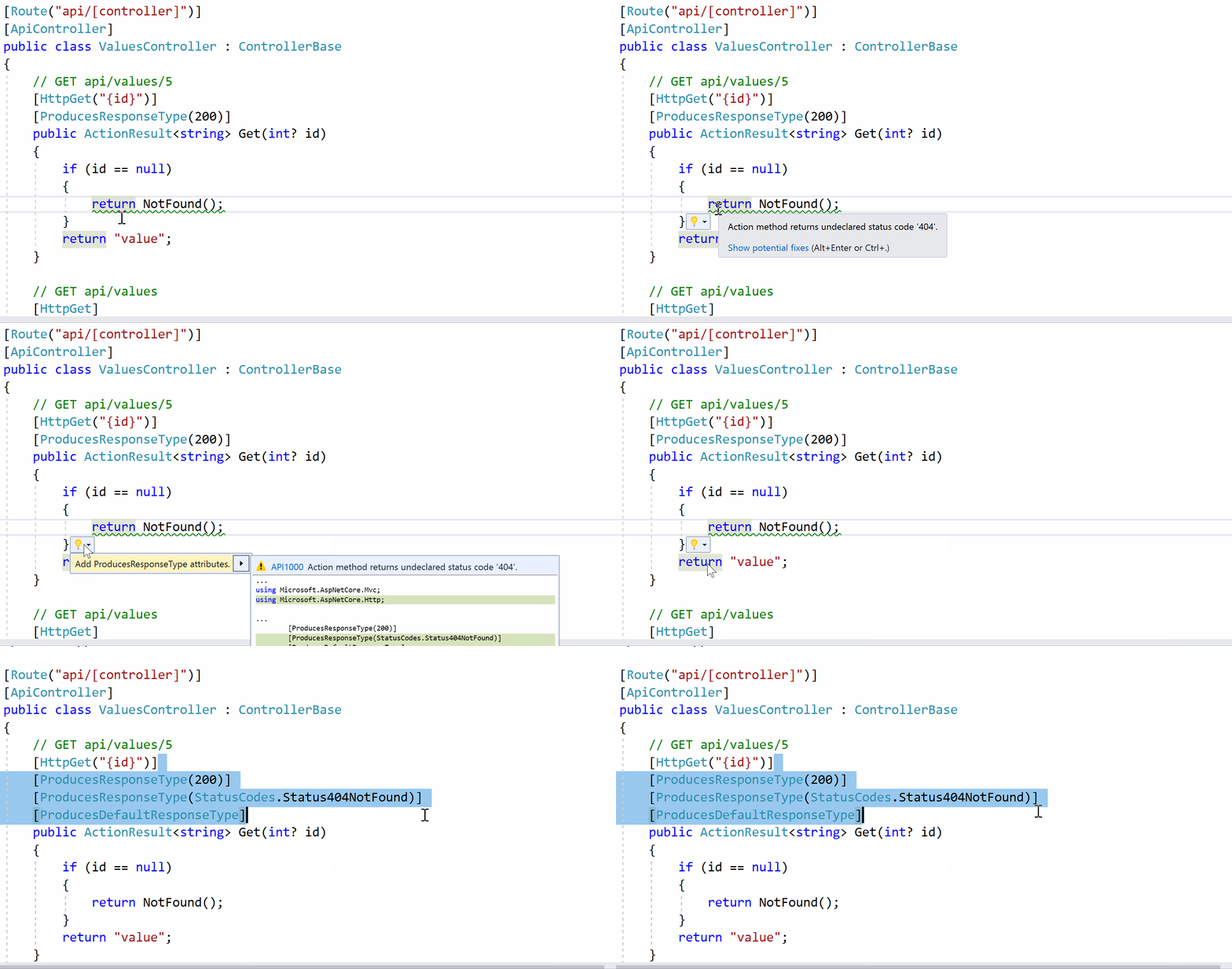
So what do these new analyzers do? One example can be explained by starting with the code snippet below:
 // GET api/values/5
 [HttpGet("{id}")]
 [ProducesResponseType(200)]
 public ActionResult<string> Get(int? id)
 {
    if (id == null)
    {
       return NotFound();
    }
    return "value";
 }
In this simple Get method in my API Controller, it returns an HTTP 200 (Success!) Status Code when everything is going well, which is indicated by [ProducesResponsesType(200)]. But if the id value is null, it returns NotFound(). In this case, the analyzer can automatically guide you to add the proper attribute for a HTTP 400 (Not Found) Status Code as well.
See this illustrated in the GIF below:
API Analyzer Example
Here is the end result:
 // GET api/values/5
 [HttpGet("{id}")]
 [ProducesResponseType(200)]
 [ProducesResponseType(StatusCodes.Status404NotFound)]
 [ProducesDefaultResponseType]
 public ActionResult<string> Get(int? id)
 {
    if (id == null)
    {
       return NotFound();
    }
    return "value";
 }
If you use common API Conventions, you can make your life even easier by using Conventions. Conventions can be applied via attributes in 3 different ways: at the assembly level, at the controller level and at the method level, each deeper level superseding the attribute at the higher level. These can then be superseded by ProducesResponseType applied at an action level.
Three examples are shown below:
At the assembly level:
[assembly: ApiConventionType(typeof(DefaultApiConventions))]
At the controller level, e.g. ItemsController
[ApiConventionType(typeof(DefaultApiConventions))]
[ApiController]
[Route("/api/[controller]")]
public class ItemsController : ControllerBase
{
   ...
}
At the method level, e.g. PutItem()
// PUT: api/items/5
[ApiConventionMethod(typeof(DefaultApiConventions), nameof(DefaultApiConventions.Put))]
[HttpPut("{id}")]
public async Task<ActionResult<Item>> PutItem(long id, Item item)
{
   ...
}
For more information, check out the official announcement from August 2018:

What’s New in EF Core 2.2 & 3.0

EF Core 2.2 includes some new features and a ton of bug fixes. New features include:
  • Spatial data support: used to represent the physical location and shape of objects
  • Collections of owned entities: extends the ability to model ownership to 1-to-many associations, going beyond 1-to-1 associations (previously added in 2.0)
  • Query tags: allows you to annotate a LINQ query with a string of text that appears as comments in generated SQL output (which may be captured in logs)
EF Core 3.0 will bring several new features:
  • LINQ improvements
  • Cosmos DB support
  • C# 8.0 support
  • Reverse engineering database views into query types
  • Property bag entities
  • EF 6.3 on .NET Core
These are all explained in detail in the official announcement:

What to Expect in C# 8.0

From one of the C# 8.0 announcements“The current plan is that C# 8.0 will ship at the same time as .NET Core 3.0. However, the features will start to come alive with the previews of Visual Studio 2019”.
Here are some new features you can expect in C #8.0:
  • Nullable Reference Types: get a friendly warning if you try to assign non-nullable reference types to null. This setting can be toggled, to assist in future projects and also provide warnings in existing projects. In other words, C# 8.0 allows you to express “nullable intent”.
string myString = null; // Friendly Warning!
string? myString = null; // This is ok
  • IAsyncEnumerable<T> for consumption of async streams: It is essentially an asynchronous version of IEnumerable<T>, allowing you to await foreach over the items in an async stream.
async IAsyncEnumerable<int> GetBigResultsAsync()
{
   await foreach (var result in GetResultsAsync())
   {
      if (result > SomeValue) yield return result; 
   }
}
  • Ranges and Indices: A new Index type and a .. (two dots) range feature bring in the ability to easily slice through subsets of ranges of values. You may have missed such a feature in C# if you’ve worked with Python to manipulate your data.
// for an array of ints
int[] myArray = { 0, 1, 2, 3, 4, 5, 6, 7, 8, 9 };
Index index1 = 3; // 0-index, number 3, counted from beginning
Index index2 = ^4; // 4th item from end, counting backwards 

Console.WriteLine($"{myArray[index1]}, {myArray[index2]}"); // "3, 6" 

var mySlice = myArray[index1..index2]; // { 3, 4, 5 } not including end 
When I used the above code in Visual Studio 2019 Preview 1, I had to update my .csproj to use C# 8.0. Take a look at the example below:
<Project Sdk="Microsoft.NET.Sdk"> 
<PropertyGroup>
 <OutputType>Exe</OutputType>
 <TargetFramework>netcoreapp3.0</TargetFramework>
 <LangVersion>8.0</LangVersion>
 </PropertyGroup> 
</Project>
  • Default implementations of interface members: this gives you the ability to add a real implementation of an interface member that will be used by any class that implements the interface but doesn’t explicitly define the member in its class. Existing classes will automatically get this implementation.
interface ILogger
{
   // method 1 defined in interface 
   void Log(LogLevel level, string message);
   
   /// method 2 can be added to interface, even after class was created
   void Log(Exception ex) => Log(LogLevel.Error, ex.ToString()); 
} 

class ConsoleLogger : ILogger
{
   // method 1, explicitly implemented in class   
   public void Log(LogLevel level, string message) { ... }
  
   // method 2, Log(Exception) gets default implementation
}
You can get more information on C# 8.0 features at:

References, Docs & Tutorials

New/Updated Downloads:
.NET Core 3 and ASP .NET Core 3.0 References:
ASP .NET Core 2.2 Tutorials, Samples and Docs:
Open API (Swagger) References 
ASP .NET Core 3.0
C# 8.0 Tutorials, Samples and Docs:
References for Microsoft Connect(); (Dec 4, 2018)